Should You Buy the Xps 14 2024 in 2026? A Deep Dive
It has been exactly two years since Dell introduced the radical redesign of its premium laptop lineup, and the XPS 14 (9440) remains one of the most polarizing pieces of technology I have ever owned. I remember the mixed emotions I felt when I first unboxed this machine. It looked like something pulled from a science fiction movie set—minimalist, seamless, and almost eerily clean. But after living with it as my primary daily driver for nearly eighteen months, I can tell you that the reality of using this laptop is far more complex than its striking aluminum shell suggests.
As we sit here in 2026, the laptop market has shifted significantly. We have seen the arrival of even more efficient silicon, the normalization of "AI PCs," and a move back toward physical function keys in some competing professional lines. In this context, the XPS 14 2024 stands as a fascinating case study in design versus utility. I’ve taken this laptop through countless coffee shops, international flights, and late-night editing sessions, and I’ve developed a love-hate relationship with it that I want to share with anyone currently looking at a refurbished or "new-old-stock" model today.
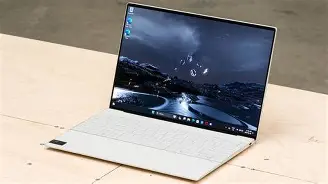
The Design: Still the Most Beautiful Laptop at the Table
When I pull this machine out in a library or a meeting, people still stare. The CNC-machined aluminum chassis in Graphite is, in my opinion, the pinnacle of industrial design from that era. Even in 2026, it doesn't look dated. Most laptops from 2024 have begun to show their age through thicker bezels or traditional keyboard layouts, but the XPS 14 looks like it arrived yesterday from the future. The "seamless glass haptic touchpad" is still the centerpiece that catches everyone's eye. Because there are no visible lines defining where the trackpad starts or ends, the palm rest looks like a single, unbroken piece of glass.
In my experience, however, beauty often comes with a learning curve. For the first few weeks, I found myself constantly missing the trackpad area. I’d try to click near the edges and realize I was pressing on the static glass of the palm rest. After a few months, muscle memory kicked in, and I can now navigate it without looking, but it is a genuine "form over function" trade-off. What I found was that the haptic feedback itself is excellent—it feels like a real click, and you can customize the pressure—but I still occasionally find myself wishing for a tactile border when I’m working quickly.
The Keyboard and the Infamous Capacitive Row
The keyboard on the XPS 14 is what Dell called "lattice-less." The keys are large, flat, and have almost no space between them. I was surprised by how much I actually enjoy typing on this. There is a surprising amount of travel (about 1.0mm), and the keys feel snappy. I’ve written hundred-page reports on this machine, and my fatigue levels were lower than they were on my previous thinner ultrabooks. Deep down, I prefer this "island" style to the cramped keys of many 13-inch alternatives.
However, we have to talk about the elephant in the room: the capacitive touch row. Instead of physical Function/Media keys, Dell used backlit touch icons. When I first bought the XPS 14, I thought I could get used to it. After a year and a half, I can tell you that it remains my biggest disappointment. One thing that bothered me specifically was the "disappearing act." Sometimes the icons don't light up immediately when you wake the laptop, leaving you guessing where the Escape key is. In the dark, it’s fine, but in bright sunlight, the icons can wash out. If you are a coder or someone who relies on F-keys for shortcuts in Excel or Creative Cloud, this is a legitimate hurdle that never quite goes away.
Display Quality: The OLED Saving Grace
I opted for the 3.2K OLED touch display version, and honestly, if it weren't for this screen, I might have sold the laptop months ago. Even in 2026, the color accuracy and contrast levels are breath-taking. I’ve been using this for photo editing and video color grading, and the blacks are truly pitch black. The 120Hz refresh rate makes every scroll and window movement feel liquid smooth. I’ve noticed that even newer 2026 mid-range laptops still struggle to match the sheer vibrance of this specific panel.
There is a downside to this brilliance, though. I found that the OLED panel is a significant drain on the battery. If I’m working on high-brightness levels outdoors, I’m lucky to get six hours of real-world use. When I’m just doing word processing at 40% brightness, I can stretch it to eight or nine, but this was never a "full-day" laptop for me without a charger. If you're looking at buying this used, keep in mind that OLED panels do age, though I haven't seen any noticeable burn-in on mine yet thanks to the pixel-shifting tech Dell built-in.
Discover deals on Electronics — updated daily.
Shop Amazon →Performance in 2026: Is the Intel Core Ultra 7 Still Enough?
The XPS 14 (9440) was built on the Intel Core Ultra (Series 1) architecture, specifically the Core Ultra 7 155H in my unit, paired with an NVIDIA RTX 4050. Two years later, how does it hold up? For most people, the answer is "perfectly fine," but with some caveats. In my day-to-day workflow—which involves about 30 Chrome tabs, Slack, Spotify, and the occasional Lightroom session—the machine is still snappy. I don't feel the "lag" that usually starts to haunt Windows laptops after two years.
What I found was that the thermal management is the real bottleneck. Because the laptop is so thin and the design is so sealed-in, the fans kick on frequently. During sustained workloads, the area above the capacitive row gets remarkably hot to the touch. I notice that the performance throttles down after about 20 minutes of heavy rendering. Compared to the MacBooks of the same era or the 2025/2026 ARM-based Windows laptops, the XPS 14 feels like it's working much harder (and getting much louder) to achieve the same results. If you are a heavy gamer or a professional 4K video editor, you will likely find the 2024 internal hardware a bit restrictive by today’s standards.
The Connectivity Struggle
I have to be honest about the ports. You get three Thunderbolt 4 ports and a microSD card slot. That’s it. Dell was kind enough to include a USB-C to USB-A/HDMI dongle in the box, which I’ve carried in my bag for 18 months like a lifeline. I’ve lost count of how many times I was at a presentation and realized I didn't have my "tail" to connect to a projector. In 2026, where more peripherals are USB-C, it’s less of an issue than it was in 2024, but the lack of a full-sized SD card slot on a "Creator" laptop still feels like a miss. I’m a photographer, and having to use a dongle just to offload photos from my camera is a friction point I never enjoy.
Summary of My Findings: Pros and Cons
After a year and a half of daily use, here are the highlights and the frustrations that stand out the most. This isn't from a spec sheet; this is from my life.
- Pros: The industrial design is unrivaled and still feels cutting-edge in 2026. The 3.2K OLED display is one of the best ever put into a 14-inch laptop. The speakers are surprisingly deep and loud, with great spatial separation for movies. Build quality is rock solid; the hinge hasn't loosened at all, and the aluminum hasn't chipped or scratched easily.
- Cons: The capacitive touch row remains frustrating and slower to use than physical keys. Battery life is mediocre on the OLED model, especially compared to contemporary ARM-based rivals. Thermal throttling is real; the laptop runs hot under pressure. The invisible trackpad has a steep learning curve that might frustrate less patient users.
Technical Comparison: 2024 XPS 14 vs. 2026 Standards
To give you a better idea of how this machine stacks up against what you can buy today, I’ve put together this table comparing the 2024 XPS 14 to the general standards we expect from a premium 14-inch laptop in 2026.
| Feature | XPS 14 (2024 Model) | 2026 Premium Standard | Verdict |
|---|---|---|---|
| Processor | Intel Core Ultra 7 (Series 1) | Intel Core Ultra 9 (Series 3) or ARM v3 | Dated but Capable |
| Display | 120Hz OLED (3.2K) | 120Hz+ Tandem OLED or Micro-LED | Elite/Competitive |
| Input Row | Capacitive Touch Row | Physical Keys (Adaptive) | Controversial |
| Battery Life | 7-9 Hours (Real-world) | 14-18 Hours (Real-world) | Poor |
| AI Performance | 34 NPU TOPS | 100+ NPU TOPS | Basic AI Tasks Only |
Buying Guide: Should You Pull the Trigger?
If you are looking at the XPS 14 2024 today in 2026, you are likely finding it at a heavy discount on the secondary market. Here is how I would break down whether or not you should actually buy it based on your specific needs.
The "Yes" Category
In my experience, this laptop is perfect for the "Aesthetic Professional." If your work mostly involves writing, emails, presentations, and light media consumption, and you want the most beautiful machine in the room, this is it. The build quality feels significantly more "expensive" than a standard plastic or thin-alloy laptop. Also, if you can find the 32GB RAM configuration, it will still feel snappy for multi-tasking well into 2028. If you are a student who wants a "cool" laptop that stands out and you don't mind carrying a charger to the library, the XPS 14 is a joy to use for media.
Find top-rated Electronics products at great prices.
Browse Now →The "No" Category
I would tell you to avoid this machine if you are a "Function-First" user. If you use the Function keys constantly for coding (F5 to debug, F10 to step over), the capacitive row will eventually drive you crazy. You will miss the tactile response. Additionally, if you are a "Road Warrior" who spends 10 hours a day away from a plug, this isn't the machine for you. The 2025 and 2026 generations of laptops have made massive leaps in efficiency that the 2024 Intel chips simply can't match. You will be much happier with a more modern ARM-based Windows laptop if battery life is your top priority.
What to Look for When Buying Used
If you do decide to go for it, I noticed that the Graphite finish hides fingerprints better than the Platinum (Silver) version, but it shows dust much more prominently. Check the battery cycle count if possible; since the battery life wasn't amazing to begin with, a heavily used unit from 2024 might only give you 4-5 hours of life now. Also, ensure the haptic motor for the trackpad is functioning correctly. I’ve heard of some units where the haptic feedback became "mushy" over time, though my own unit has stayed crisp.
The Verdict: A Beautiful Artifact of an Experimental Era
Reflecting on my time with the XPS 14, I see it as a daring experiment. Dell tried to push the boundaries of what a laptop should look like, and in many ways, they succeeded. It is a piece of art that you can run Windows on. But as a tool, it requires compromises that we usually don't have to make anymore in 2026. After using it for over a year, I still find myself reaching for it because of that incredible screen and the solid feel of the keyboard, but I also find myself sighing when I have to look down to find the Delete key on the touch row.
In 2026, the Dell XPS 14 2024 is no longer the "best" laptop in its class by any objective measure of performance or battery life. However, it remains one of the most unique and luxurious experiences you can have with a portable computer. If you can live with its quirks and find it at a price point that reflects its age, it is still a remarkably capable machine that handles the basics with style. Just make sure you really, really love that screen, because that is the part of this laptop that truly stays ahead of its time.
My journey with this laptop has taught me that I value a great display over almost anything else, which is why I’ve kept it. But it also taught me that no matter how futuristic a design looks, it still has to function in the mundane, physical world of cables, sunlight, and tactile feedback. As we move further into 2026, the XPS 14 2024 sits as a bridge between the old world of hot, powerful Intel laptops and the new world of seamless, aesthetic computing. It’s not for everyone, but for the right person, it’s a bargain for a piece of hardware that still feels like it was built tomorrow.