5 Hidden Features of the Dell Pro 32 Plus Business Monitor You Must Know About
In the evolving landscape of the modern workspace, the monitor has transitioned from a mere peripheral to the command center of professional productivity. As remote and hybrid work models solidify, professionals are increasingly seeking displays that offer more than just a large diagonal measurement. The Dell Pro 32 Plus Business Monitor has emerged as a titan in this category, often lauded for its expansive 4K canvas and reliable build quality. However, beneath its sleek, corporate exterior lies a suite of advanced functionalities that many users overlook. These features are specifically designed to streamline complex workflows, enhance visual ergonomic health, and simplify cable management in a way that fundamentally alters the user experience.
The "Pro" designation in Dell’s lineup typically signifies a balance of premium performance and enterprise-grade reliability. With the 32 Plus model, Dell has pushed the boundaries of what a standard business display can achieve. While most buyers focus on the 31.5-inch screen size and ultra-high-definition resolution, the true value of this investment is found in its sophisticated internal hardware and firmware. Understanding these hidden features is essential for power users, creative directors, and data analysts who require a display that can keep pace with demanding multitasking and high-precision tasks. This article explores the nuanced capabilities of the Dell Pro 32 Plus, revealing how it stands as a versatile tool for the modern professional.
Advanced Connectivity: The Power of Thunderbolt 4 Daisy Chaining
Connectivity is often the primary reason professionals choose the "Plus" variant in Dell’s professional lineup. While most are aware of the single-cable USB-C solution for charging and data, the inclusion of Thunderbolt 4 (or high-bandwidth USB4 depending on the specific revision) enables a hidden gem: true high-speed daisy chaining. This feature allows users to connect a second 4K monitor directly to the back of the Pro 32 Plus, rather than needing to run a separate cable to the laptop or a dedicated docking station. For those who find a single 32-inch screen insufficient, the ability to create a seamless dual-monitor array with minimal cabling is a significant ergonomics victory.
This daisy-chaining capability is supported by Multi-Stream Transport (MST) technology. It effectively turns the monitor into a high-powered hub. Beyond video, the Dell Pro 32 Plus manages the distribution of power across the chain. When a laptop is connected via the primary port, it can receive up to 90W of power delivery, which is sufficient for even power-hungry mobile workstations like the Dell Precision or MacBook Pro 16. The hidden advantage here is the reduction of "cable clutter fatigue." By centralizing all peripherals—ethernet, mice, keyboards, and secondary displays—into the monitor itself, the desk remains clean, fostering a more focused and professional working environment.
The Internal KVM Switch and Auto-KVM Logic
One of the most powerful yet frequently underutilized features of the Dell Pro 32 Plus is the integrated Keyboard, Video, and Mouse (KVM) switch. Many professionals today operate two systems: perhaps a powerful desktop workstation for rendering or data processing and a slim laptop for meetings and remote work. Traditionally, switching between these required either manual cable swapping or an expensive external KVM box. The Pro 32 Plus eliminates this friction entirely. By connecting one PC via the USB-C port and another via the DisplayPort or HDMI (plus a USB upstream cable), users can control both machines using a single set of peripherals.
The "hidden" aspect of this feature is the "Auto-KVM" logic found within the Dell Display Manager software. Instead of digging through the On-Screen Display (OSD) menus to switch inputs, the monitor can be configured to detect which system is active and automatically transition the control of the keyboard and mouse. Furthermore, the monitor supports Picture-in-Picture (PiP) and Picture-by-Picture (PbP) modes. This allows the user to see the output of both computers simultaneously on the 32-inch screen. For software developers testing code across different operating systems or financial analysts monitoring real-time feeds from two different sources, this feature is a transformative productivity enhancer.
ComfortView Plus: Hardware-Level Blue Light Mitigation
Digital eye strain is a critical concern for anyone spending more than eight hours a day in front of a screen. Most monitors offer a "blue light filter" that simply turns the screen a yellowish tint, which can be jarring and inaccurate for color-sensitive work. The Dell Pro 32 Plus features "ComfortView Plus," a hidden hardware-level solution that is always on. Unlike software filters, this is built into the LED backlight itself. It reduces harmful blue light emissions without sacrificing the color accuracy or the white balance of the display. Users get the protection they need without the "sepia tone" often associated with eye-care modes.
Find top-rated Electronics products at great prices.
See Deals →This feature is particularly important for professionals who work in design, marketing, or spreadsheet-heavy roles where color differentiation is vital. Because the blue light mitigation is integrated into the hardware, it doesn't require any user intervention or software installation to function. This "set it and forget it" approach to ocular health is a hallmark of Dell’s business philosophy. Over long-term use, buyers report significantly lower instances of headaches and eye fatigue, making the Pro 32 Plus a sustainable choice for career longevity in the digital age.
ISP Black Technology and Enhanced Contrast Ratios
While the Pro 32 Plus is marketed as a business monitor, it borrows high-end panel technology typically reserved for the UltraSharp series. Many units in the Pro 32 Plus line utilize IPS Black technology. Standard IPS (In-Plane Switching) panels are known for great color and viewing angles but often struggle with "IPS glow" and grayish blacks. IPS Black technology provides a significantly higher contrast ratio—often reaching 2000:1 compared to the standard 1000:1 found in entry-level corporate displays. This means blacks appear deeper, shadows have more detail, and the overall image has a richness and depth that aids in visual clarity.
The practical benefit of this hidden panel feature is evident when working with high-detail content. Architects viewing complex CAD drawings or video editors working on corporate presentations will notice that fine lines and subtle gradients are more discernible. The enhanced contrast also makes text appear sharper against white backgrounds, which reduces the effort required for reading long-term documents or scanning through thousands of lines of code. It bridges the gap between a standard office monitor and a professional-grade creative display, offering a level of visual fidelity that justifies its "Plus" branding.
MAC Address Pass-Through and PXE Boot for Enterprise Security
The final hidden feature is one that IT departments appreciate and end-users rarely notice until it saves the day: MAC Address Pass-Through and PXE Boot support. Because the Dell Pro 32 Plus includes a built-in RJ45 Ethernet port, it acts as a wired network adapter for the connected laptop. However, in secure corporate environments, network access is often restricted based on the unique MAC address of the laptop. When a laptop connects through a standard dock or monitor, the network sees the monitor's MAC address instead. Dell’s "MAC Address Pass-Through" ensures that the connected laptop’s unique identity is transmitted to the network, maintaining security protocols and allowing IT teams to easily identify and manage devices.
Additionally, the monitor supports PXE (Preboot Execution Environment) Boot. This allow IT administrators to remotely wake, update, or re-image a laptop while it is docked to the monitor, even if the laptop is powered off. These aren't "glamour" features that you'll see in a marketing brochure for home users, but for the enterprise buyer, they are essential. They ensure that the monitor fits seamlessly into a managed corporate infrastructure, providing the stability and security required by modern IT standards. It transforms the monitor from a display into a secure node within the company's digital ecosystem.
Professional Analysis and Real-World Performance
In practice, the Dell Pro 32 Plus is a study in functional elegance. The 31.5-inch 4K UHD resolution (3840 x 2160) provides a pixel density that makes scaling unnecessary for many users. At 100% scaling, the workspace is immense, allowing for three full-sized browser windows or document pages to be viewed side-by-side. The color coverage is typically excellent for the price bracket, often covering 99% of the sRGB color gamut. This ensures that brand colors in presentations or marketing materials look consistent and professional.
Looking for the best Electronics deals on Amazon?
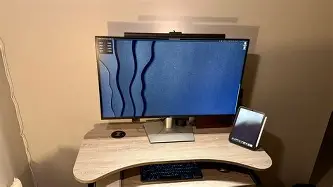
See Deals →The build quality is another area where the "Pro" label carries weight. The stand is robust, offering height, tilt, swivel, and pivot adjustments. The pivot feature—turning the 32-inch screen into a vertical orientation—is particularly useful for developers reviewing long blocks of code or legal professionals reading lengthy contracts. The stand also occupies a relatively small footprint on the desk, despite the size of the panel, and features a sophisticated cable management slot that keeps the workspace tidy.
Pros and Cons
- Pro: Massive 4K workspace provides ample room for intricate multitasking without the need for a second monitor.
- Pro: Integrated 90W USB-C Power Delivery charges most laptops quickly while transmitting data and video.
- Pro: Hardware-based ComfortView Plus protects eyes without distorting color accuracy or introducing a heavy tint.
- Pro: Built-in Ethernet (RJ45) and extensive USB hub eliminate the need for an external docking station.
- Pro: High-end IPS Black technology delivers superior contrast and deeper blacks compared to standard office displays.
- Con: The physical size of a 32-inch monitor can be overwhelming for smaller desks or setups with shallow depth.
- Con: Lacks higher refresh rates (typically 60Hz), which is standard for business but less ideal for smooth high-motion video or gaming.
- Con: Integrated speakers (if equipped) are functional for calls but lack the depth required for high-quality media consumption.
Product Comparison: Pro vs. Standard vs. UltraSharp
| Feature | Dell Standard 32 | Dell Pro 32 Plus | Dell UltraSharp 32 |
|---|---|---|---|
| Resolution | 4K UHD | 4K UHD | 4K UHD / 6K |
| Connectivity | HDMI / DP | USB-C (90W) + RJ45 | Thunderbolt 4 + 10Gbps USB |
| KVM Switch | No | Yes (Auto-KVM) | Yes |
| Panel Tech | Standard IPS | IPS Black / High Contrast | PremierColor / IPS Black |
| Color Gamut | sRGB 99% | sRGB 99% / Rec. 709 | DCI-P3 98% / Adobe RGB |
Buying Guide: Is the Dell Pro 32 Plus Right for You?
Choosing a 32-inch monitor is a significant commitment of both budget and desk real estate. To determine if the Dell Pro 32 Plus is the right choice, consider your primary work habits. If you are a "browser tab hoarder" or someone who constantly flips between multiple applications, the large 4K resolution will provide an immediate productivity boost. The extra vertical space compared to a 27-inch 4K monitor makes a world of difference when working in data-heavy applications like Excel or Power BI.
For those working in a dedicated office environment, the "docking monitor" aspect of the Pro 32 Plus provides the best value. If you currently use a separate hub or dock to connect your laptop to your desk peripherals, you can effectively liquidate that hardware and use the monitor as your central hub. This not only simplifies your setup but also reduces the number of failure points in your system. However, if your work is strictly focused on high-end color grading for cinema or high-frame-rate competitive gaming, you might find the 60Hz refresh rate and sRGB-focused color gamut a bit limiting, in which case the UltraSharp or Alienware lines would be more appropriate.
Finally, consider your physical workstation. A 32-inch panel is roughly 28 inches wide. You should ensure your desk is at least 30 inches deep to allow for a comfortable viewing distance. Sitting too close to a screen of this size can lead to neck strain as you physically turn your head to see the corners of the display. If your workspace is compact, the 27-inch version of this monitor offers many of the same features in a more manageable footprint.
Conclusion
The Dell Pro 32 Plus Business Monitor is far more than a simple display; it is a sophisticated productivity engine that addresses the nuanced needs of the modern professional. By integrating hidden features like Thunderbolt daisy-chaining, Auto-KVM switching, and hardware-level blue light protection, Dell has created a device that prioritizes both efficiency and user well-being. While it carries a premium over entry-level displays, the consolidation of a docking station, a KVM switch, and a high-performance panel into a single unit provides an undeniable return on investment. For the professional who demands a clean workspace and a powerful, reliable canvas, the Pro 32 Plus stands as a premier choice in the business electronics market.